WarrenBarr
SEC-01
Advisories
Published findings
OPS-02
Methodology
How an engagement runs
ENG-03
IT & Dev
Build and administer
ARM-04
Software
Tooling I wrote
MSP-05
MSSP
Flat-rate managed
REC-06
Case Studies
Work, in full
WEB-07
Websites
Sites that convert
SUP-08
Gear
Coming soon
DOC-09
Doctrine
What I will not do
WHO-10
About
Who you'd be hiring
Barr Cyber/Software/GHOSTFRAME
GHOSTFRAME icon

GHOSTFRAME

CRT HACKER DECK  ·  WINDOWS TERMINAL  ·  SECURITY PLATFORM
►  v3.0.5  ·  Free & Open Source

A real GPU CRT pixel shader for Windows Terminal that ships with a full security and sysadmin platform built in. One GHOSTFRAME.bat, one UAC prompt, twenty built-in tools.

FreeOpen SourceWindows 10/11PowerShell 5.1+WSL / KaliNo telemetry

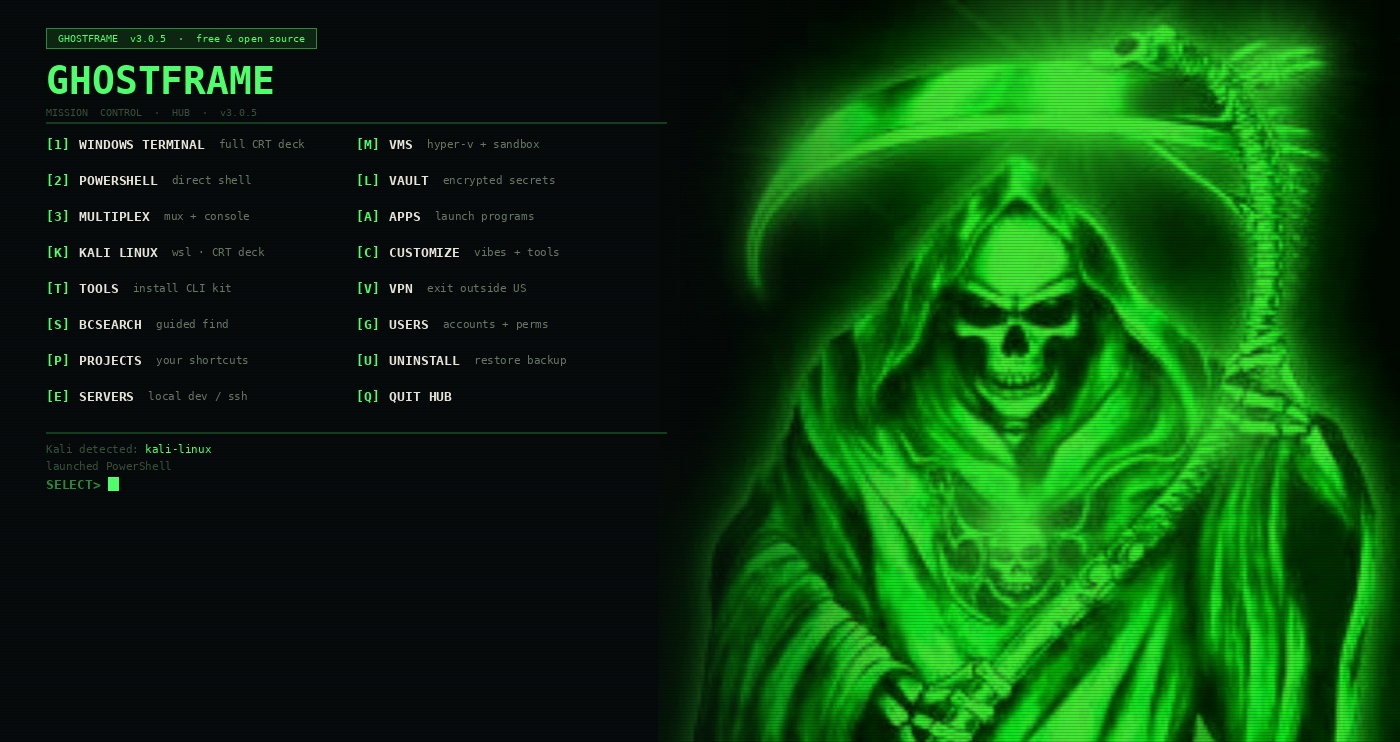
GHOSTFRAME // hub — the mission-control boot menu

GHOSTFRAME // hub
GHOSTFRAME hub boot menu with phosphor CRT shader
20+
Hub tools
42
GhostClean cats
61
menu<tool> panels
1
UAC prompt, ever
0
Telemetry
New in v3.0.5 — Smart Firewall rebuilt from scratch. 11 screens. Port scan → process map → 31-port danger list → HIGH/MED/LOW ratings → one-key apply-all. Six curated presets. Block by program path. Audit screen. CSV export. Jump to Firewall ↓
// Try it — interactive demo, sample data only

A working simulation of the GHOSTFRAME hub running against a fake machine. No commands actually execute — type a key or a tool name and hit Enter to explore.

GHOSTFRAME // hub — interactive demoSAMPLE DATA
SELECT> 
// Capability overview — click any card to go deeper
[W] REBUILT
Smart Firewall
Port scan with process mapping, 31 danger flags, 6 presets, block by program, audit screen.
11 screens →
[K]
GhostClean
10-tool optimizer. 42 categories, SHA256 duplicates, DoD shredder, space analyser, startup manager.
Rivals CCleaner →
[L]
VAULT
AES-256-CBC + HMAC-SHA256 + PBKDF2 (600k) + DPAPI. Password store, file vault, 3D navigator.
4-layer crypto →
[K]
Kali Linux
WSL Kali with guided RECIPES, Metasploit workflows, chained playbooks, Kali Purple, scope enforcement.
Press K, it’s ready →
[H]
BCHunt OSINT
Passive attack surface recon. RDAP, DNS, crt.sh, TLS, Shodan, HIBP, typosquat, phone intel.
Zero active scanning →
[D]
IdeaSpace
WPF 3D mind maps and network diagrams. Live HUNT mode that enriches from BCHunt in real time.
Fly around the graph →
[Y]
SysAdmin
Health dashboard with GPU, 11-check full sweep, baseline diff, suspicious-signal triage, FIX-IT pass.
type “sweep” →
[3]
MULTIPLEX
Borderless split workspace. Control console drives all panes with single keypresses and logs every action.
tmux-style →
[C]
CRT + Vibes
Real HLSL GPU shader — scanlines, phosphor glow, curvature. Six phosphor presets. Tune live in CUSTOMIZE.
Not a wallpaper →
[X]
AI Tools
Claude Desktop + local Ollama models. In-hub chat with context. Custom OpenAI-compatible endpoints.
Fully local option →
[V]
VPN
OpenVPN + VPN Gate (University of Tsukuba). Always picks a non-US exit. Zero accounts, zero cost.
Free, open source →
[E][G][J][R][F][Z][S][P]
+ Eight More Tools
Servers, Users, NETMON, Patches, Findings, Hashes, BCSearch, Projects, BCScribe, ez, menu<tool>…
See all →
// v3.0.5 — completely rebuilt
Smart Firewall — Finally a Firewall That Thinks
HUB → [W]

Old firewall tools give you a blank rule editor. GHOSTFRAME’s scans your running system, maps every listening TCP port to the owning process and executable path, checks whether rules already exist, rates each port HIGH/MED/LOW, and offers one key to act on everything at once — or lets you handle them individually.

[1]
Scan + Suggest
Every listening TCP port mapped to process → executable path → existing rules. 31 known-dangerous ports rated HIGH/MED/LOW. Then: [a] apply-all, [b] block-all-dangerous, or [i] handle each port individually with allow/block/allow-by-program.
[2]
Six Presets
Curated rule sets that preview before applying and log every change to Findings. See below.
[6]
Block/Allow Port
Create a named GF- rule for any port. Option to restrict to a specific program path instead of all traffic.
[7]
Block Program
Block a specific executable both inbound and outbound by file path, not just port number.
[a]
Audit Screen
Every listening port with zero existing firewall rules — your blind spots — in one view.
[e]
Export CSV
Full rule set export for documentation, compliance records, or peer review.
Workstation
Block SMB, RDP, NetBIOS, WinRM, Telnet. Allow HTTP/HTTPS/DNS.
Server
Allow HTTP/HTTPS/SSH. Block SMB, RDP, Telnet, FTP, MongoDB, Redis.
Dev
Block all common dev-server ports externally: 3000, 4200, 5000, 5173, 8080, MySQL, Postgres, Redis.
Pentest
Open C2/handler ports 4444/4445/443/80/SSH. Lock down SMB and RDP.
Lockdown
16-rule block of the entire known-dangerous port surface at once.
MSSP
WinRM-HTTPS management + SNMP/Syslog monitoring. Block WinRM-HTTP and RDP.
GHOSTFRAME [W] FIREWALL — SCAN + SUGGEST
┌── GHOSTFRAME FIREWALL v3.0.5 ────────┐ 11 screens · intelligent port analysis └────────────────────────────────────────┘ [1] Scan + Suggest [6] Block/Allow Port [2] Presets [7] Block Program [3] GF Rules View [8] Delete GF Rules [4] Inbound View [9] Toggle Profiles [5] Search Rules [e] Export CSV [a] Audit (no rules) ── LISTENING PORTS ────────────────────── HIGH 445 SMB svchost.exe NO RULE HIGH 3389 RDP svchost.exe NO RULE MED 5985 WinRM-HTTP System NO RULE MED 6379 Redis redis.exe NO RULE SAFE 443 HTTPS nginx.exe RULE OK SAFE 80 HTTP nginx.exe RULE OK 4 ports need attention [a] apply-all [b] block dangerous [i] per-port
// v3.0.0 — 10-tool system optimizer
GhostClean — Rivals CCleaner, Built Right In
HUB → [K]

Not a button that deletes your temp folder. A real scan → select → clean loop across 42 categories, with SHA256 duplicate detection, a Space Analyser with infinite drill-down, a registry cleaner with safe/caution ratings, a startup manager with boot-time impact scoring, and a running total of every byte freed across sessions.

GHOSTFRAME [K] GhostClean — Smart Scan
GhostClean v3.0.5 ───────────────────────── [1] Smart Scan + Clean [6] Space Analyser [2] Quick Clean [7] Startup Manager [3] Duplicate Finder [8] Registry Cleaner [4] Large File Finder [9] File Shredder [5] Empty Folder Finder [0] Clean History SCANNING 42 CATEGORIES ████████████████████▓▓▓▓▓▓▓▓▓▓ 68% Selected: 31 of 42 Total: 5.8 GB [+] Windows Temp 2.1 GB [+] Windows Update Cache 1.4 GB [+] Chrome + Edge Cache 645 MB [+] Teams / Zoom / Discord 488 MB [+] VS Code extension cache 322 MB [+] npm / pip / NuGet logs 284 MB [+] Crash dumps + WER 211 MB [ ] Recycle Bin (optional) [a] all [n] none [#] toggle [c] CLEAN
1
Smart Scan + Clean
42 categories across Windows, Browser, Privacy, Apps, Deep, Custom. Animated progress bar. Toggle categories with [#], or [a]/[n] for all/none. Persistent exclusion list. Custom paths. Clean history saved across sessions.
3
Duplicate Finder
SHA256 hash comparison across a folder. Configurable minimum file size. Keeps the first copy, shows you the duplicates before anything is deleted.
6
Space Analyser
Biggest folders ranked with proportional bar charts. Infinite drill-down navigation into subfolders. Delete from within the analyser.
7
Startup Manager
Registry Run keys + CIM startup items. Each rated slow/med/fast for boot impact. Disable with automatic backup — fully reversible.
8
Registry Cleaner
Orphaned uninstall paths, missing file-association executables, broken startup entries. Each item rated safe or caution. Delete individually or all-safe at once.
9
File Shredder
DoD 5220-style multi-pass overwrite — 0x00, then 0xFF, then random bytes — before deletion. Unrecoverable by design.
// AES-256-CBC + HMAC + PBKDF2 + DPAPI
VAULT — Four Layers of Actual Cryptography
HUB → [L]

Not a password manager with a PIN. PBKDF2-HMAC-SHA256 at 600,000 iterations derives separate AES and HMAC keys. AES-256-CBC encrypts with a fresh IV on every save. HMAC-SHA256 verifies in constant time before decryption ever runs. DPAPI wraps the whole blob to your Windows account on this machine. Forget the password: there is no recovery. That’s the point.

store
Password Store
Add entries with name, username, masked secret, URL, and notes. [r] reveal, [c] copy to clipboard. Clipboard is wiped on lock. [L] locks and wipes the AES + HMAC keys from memory.
[f]
Encrypted File Vault
Add files via Windows multi-select picker. Any size, any quantity. Streamed AES-256-CBC per file — a 10 GB file never has to fit in memory. HMAC verified before any decryption runs.
[o]
Open as Folder
Decrypts into a working folder and opens it in Explorer. Drag files in and out. Edit freely. Press [s] to Seal — re-encrypts everything and wipes the plaintext. You cannot lose a file you dragged in.
[3]
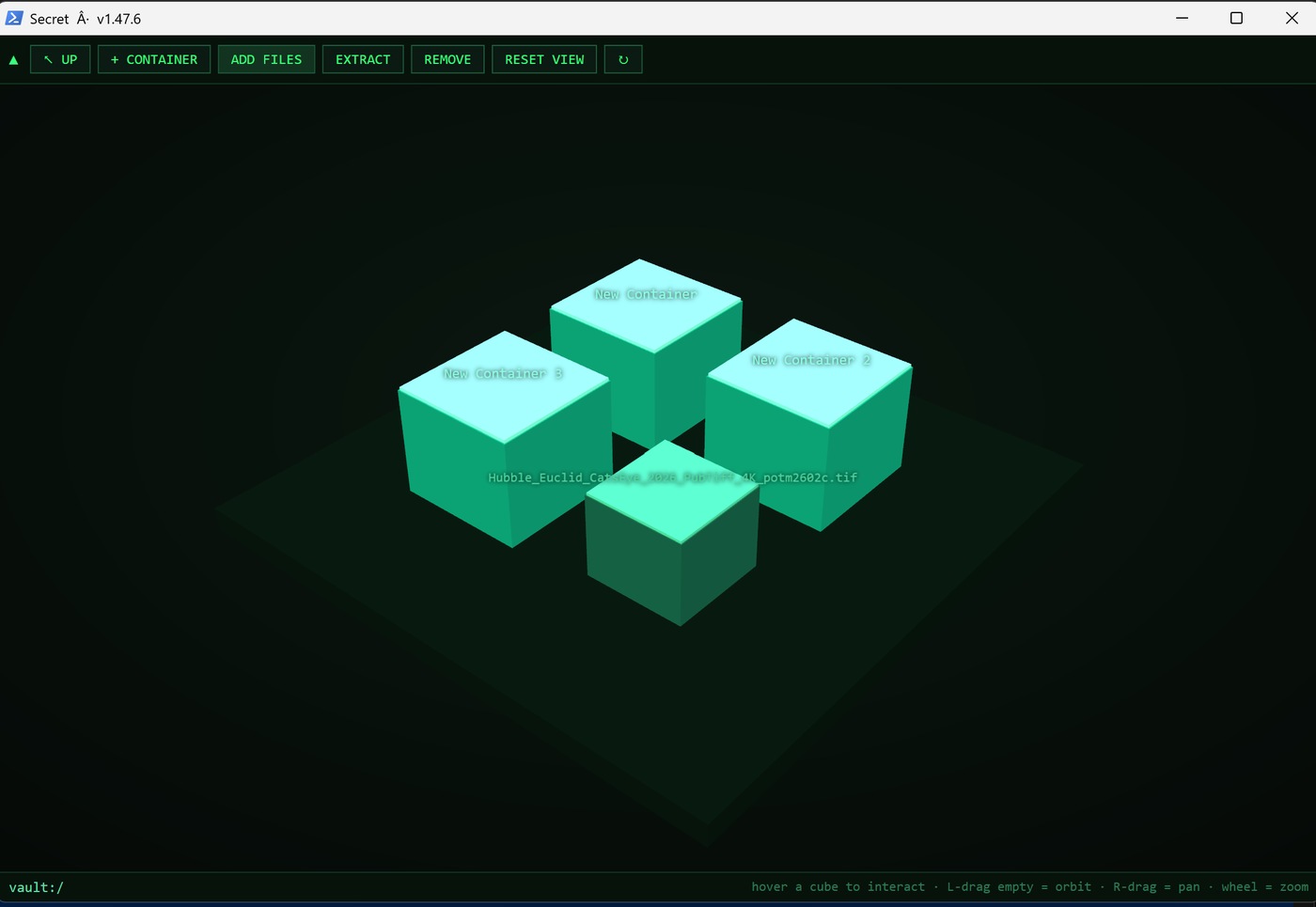
3D Storage Navigator
A separate WPF 3D window. Folders are containers. Double-click to descend, Up to climb. Left-drag orbits, right-drag pans, wheel zooms. Drag files in from Explorer or drag items out to extract a decrypted copy. Pure view over the already-unlocked vault — no master password at the WPF layer.
Crypto Stack
PBKDF2-HMAC-SHA256, 600,000 iterations — random 16-byte salt, derives 64 bytes split into two separate 32-byte keys: AES key and HMAC key.
AES-256-CBC, fresh IV per save — the IV is never reused. Same file saved twice produces completely different ciphertext.
HMAC-SHA256, encrypt-then-MAC — covers magic+iter+salt+IV+ciphertext. Verified in constant time before decryption runs. Wrong password fails at the MAC; cipher is never exercised.
DPAPI (CurrentUser) — whole blob wrapped to this Windows account on this machine. Move the file to another PC and it won’t decrypt.
GHOSTFRAME [L] VAULT — unlocked / 5 entries
VAULT ─ UNLOCKED ─ 5 entries [1] AWS root credentials aws.amazon.com · warren@barr-cyber.com [2] Netlify deploy token netlify.com · api-key [3] Barr Cyber signing cert cert store · PFX [4] PaymentCloud API keys paymentcloud.com · live + test [5] Hak5 B2B login hakshop.com · reseller ───────────────────────────────────────── [a] add [f] files [3] 3D vault [L] lock PBKDF2(600k) · AES-256-CBC · HMAC · DPAPI
3D Storage Navigator [3]
GHOSTFRAME 3D vault storage navigator
// WSL Kali Linux — auto-installed on first run
Press K. Your Kali Environment Is Ready.
HUB → [K]

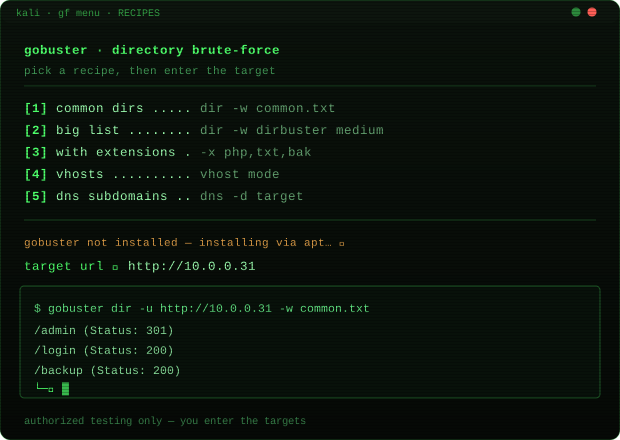
Run GHOSTFRAME.bat once and it installs a full guided menu into your WSL Kali automatically. Open Kali, type gf. Guided menus for every tool. No flags to look up. No syntax to remember. Scope enforcement blocks anything outside your CIDR allowlist before it runs. Authorized testing only.

GHOSTFRAME — Kali menu (type gf inside WSL)
GHOSTFRAME Kali menu
[r]
RECIPES — guided tool execution
Pick a category (Recon, Web, Passwords, SMB, Exploit, Wireless, Post-Ex, AD/Windows, OSINT), pick a tool, pick a recipe. GHOSTFRAME prompts for target/wordlist and runs the real command. Installs the tool via apt if it’s missing.
[5→7]
Metasploit Workflows
Auto-generated .rc scripts run via msfconsole -q -r: reverse-shell listener (auto-detects LHOST from tun0/eth0), payload generator (exe/elf/PHP/Python/ASPX/WAR), EternalBlue, db_nmap, and full post-exploitation menu (hashdump, persistence, screenshot, loot, privilege escalation).
[8]
Playbooks — chained sequences
Host triage: ping → top-1000 ports → service+version → OS+scripts → UDP top-20. Web recon: nikto → gobuster → subfinder → httpx → nuclei. AD enum: enum4linux-ng → NetExec → ldapsearch → GetUserSPNs → password policy. All results save to a timestamped directory.
[p]
Kali Purple
Installs the 5 NIST-CSF metapackages: identify, protect, detect, respond, recover. Covers GVM vuln scanning, Suricata, Zeek, Elastic SIEM, TheHive, MISP. Or build the full Purple VM from VMs → [p] — GHOSTFRAME downloads the official ISO and verifies SHA256.
[9]
Scope Enforcement
Set CIDR ranges and domains. Toggle enforcement on or off with one key. When on, any target outside the allowlist is blocked before the tool runs. Pure-bash bitwise CIDR arithmetic, no external dependencies. Persists to ~/.ghostframe/scope.env.
// Passive OSINT & attack surface recon
BCHunt — Full Attack Surface in One Command
HUB → [H]

Point BCHunt at a domain or IP. It sweeps RDAP, DNS, certificate transparency logs, live TLS, HTTP fingerprint, email policy, reverse-IP, ASN, Shodan InternetDB, HIBP breach exposure, and typosquat candidates — all passive sources, zero active scanning. Risk-scored output. Exports as text, styled HTML, and a .gfmind graph for IdeaSpace.

RDAP / WHOIS — registrar, registration/expiry, name servers, registrant org.
Full DNS — A, AAAA, MX, NS, TXT, SOA, CAA. SPF include: domains pulled and added as graph nodes.
crt.sh subdomains — certificate transparency log mining for every subdomain ever issued a cert.
Live TLS certificate — issuer, validity, and full SAN list. Each SAN becomes a new node in the graph, pivoting to adjacent hostnames.
HTTP fingerprint + header audit — server tech, missing security headers (CSP, HSTS, X-Frame-Options…).
Reverse-IP — other domains sharing the same host — the pivot that interconnects graphs.
ASN / BGP expansion — announced prefixes and peer networks via BGPView. ASN nodes are expandable.
Shodan InternetDB — open ports, CPEs, known CVEs, and tags. No API key required.
HIBP breach exposure — which breaches hit the domain, exposed data classes, affected accounts. Flags “PASSWORDS — force resets” when creds were in the dump.
Subdomain takeover detection — dangling CNAMEs to GitHub Pages, S3, Netlify, Heroku, Azure, and 20+ other services.
Typosquat detectionsquat domain.com generates 200+ permutations (homoglyphs, bitsquatting, combosquats, TLD swaps), resolves each, and reports which are live.
Phone intelligencephone <number>: E.164 validation, country, NANP area code + timezone, line type, carrier. VoIP detection against 45+ known providers.
Pwned Password checkpw: k-anonymity lookup. Only the first 5 SHA-1 chars leave the machine.
GHOSTFRAME [H] BCHunt — passive domain sweep
> bchunt barr-cyber.com Running passive sweep... RISK SUMMARY ───────────────────────── HIGH dev.barr-cyber.com → dangling Netlify HIGH CVE-2024-3400 on Shodan (PAN-OS) MED No DMARC policy on MX records MED 3 live typosquats registered MED barr-cyber.co → live, unknown owner INFO TLS valid · Let's Encrypt · 247 days INFO SPF present · DKIM ok (2 selectors) SUBDOMAINS (crt.sh) ─────────────────── admin.barr-cyber.com → 104.21.xx.xx dev.barr-cyber.com → DANGLING CNAME api.barr-cyber.com → 104.21.xx.xx SHODAN InternetDB ───────────────────── ports: 80, 443 · CPE: nginx/1.25.4 Export: report.txt · report.html · .gfmind
// WPF 3D mind maps + live OSINT
IdeaSpace — 3D Network Maps That Do OSINT Live
HUB → [D]

A WPF 3D engine built into the hub. Drop nodes, wire them, orbit the scene. Switch to HUNT mode and it runs a live passive enrichment cascade from a seed domain — auto-expanding subdomains, IPs, certs, and ASNs on a background thread while the scene stays interactive. Import any BCHunt .gfmind sweep and explore it in 3D.

IdeaSpace in HUNT mode — live enrichment cascade
GHOSTFRAME IdeaSpace 3D network visualization
mind
Mind Mapping Mode
Ideas, notes, topics, tasks, goals, decisions. Auto-spin. Node type palette in the top-left panel.
network
Network Diagram Mode
Type device names: router, firewall, switch, server, workstation. Each gets its own 3D icon mesh and color. Top-down static view reads like a flat diagram.
hunt
HUNT Mode — Live OSINT Cascade
BFS from a seed domain. Expands subdomains → IPs → certs → ASNs → breach nodes. Bounded at depth 2 and 170 nodes. Background thread — scene stays interactive. Press H again to stop.
layout
Auto-Layouts
layout radial, grid, circle, sphere, tree, scatter. Tree mode does BFS from the most-connected node. Pinned nodes stay put.
rel
Labeled Relations
rel owns api.example.com wires the selected node with a color-coded labeled connector: owns, hosts, uses, works-at… Labels render at midpoint, draw.io-style.
[m]
SysAdmin Export
From SysAdmin [Y], press [m] to export the machine as a .gfmind: host at center, linked to IP/gateway, disks, admins, listening ports, stopped services. Open it here.
demo
Sample Scene
Type demo on an empty canvas to load a pre-built attack surface map — root domain, web/mail/VPN servers, database, firewall, admin node, and a live typosquat — so you can see the tool without typing anything.
// System triage dashboard
SysAdmin — 11-Check Full Sweep, One Command
HUB → [Y] — type “sweep” in any GHOSTFRAME terminal

A complete read-only triage suite for working on an unfamiliar machine, running a health check before handing it over, or baselining after a change. Type sweep in any GHOSTFRAME terminal to run all 11 checks. If issues are found, FIX-IT offers to act on them.

dash
Visual Health Dashboard
CPU, RAM, and per-disk usage as color-coded gauge bars. Overall health score 0–100 with one-line summary of what’s dragging it down. GPU name, VRAM, utilization, and temperature (nvidia-smi or GPU perf counters).
11
Full Sweep (11 checks)
Disk health, memory pressure, resource hogs, critical event log errors, failed logon analysis, stopped auto-start services, startup item audit, reboot/update pending, active network connections. Accurate animated progress bar. Severity-coloured findings report.
FIX
FIX-IT Pass
After the sweep, FIX-IT offers to act: restart stopped services, trim working sets (RAM ≥80%), run cleanup (disk ≥85%), kill the top RAM hog, schedule a reboot. Each action has a confirm prompt.
[b][d]
Baseline Capture + Diff
Capture: services, ports, users, admins, scheduled tasks, software. Then [d] shows exactly what was added (+) or removed (-) since. The fast answer to “what changed on this machine?”
[z]
Suspicious-Signal Triage
Processes from user-writable paths, unquoted service paths (privesc risk), non-default Administrators group members, accounts with password set in the last 14 days, unusual listening ports, and Run-key autoruns to review.
[m]
Map to IdeaSpace
Exports machine internals as a .gfmind graph for IdeaSpace [D]. Host at center, linked to all its IPs, disks, admins, ports, and stopped services.
GHOSTFRAME [Y] SysAdmin — health + full sweep
SYSADMIN ─ barr-cyber-titan ─ admin ────── CPU ███████▓▓▓▓▓▓▓▓▓▓▓▓▓ 34% RAM ████████████▓▓▓▓▓▓▓▓ 11.2/16 GB C:\ ████████▓▓▓▓▓▓▓▓▓▓▓▓ 312/512 GB GPU RTX 4070 · 11.3/12 GB · 28°C Score ██████████████▓▓▓▓▓▓ 74/100 · RAM pressure FULL SWEEP ────────────────────────── ██████████████████████████████ 100% CRIT 4 failed admin logons (last 24h) CRIT 2 stopped services: WSearch, BITS WARN Reboot pending (Windows Update) WARN RAM 70% · top hog: chrome.exe 2.1 GB INFO 28 startup items · 3 rated SLOW [f] FIX-IT [e] export [m] IdeaSpace map
// Borderless split workspace
MULTIPLEX — Control Console Drives Everything
HUB → [3]

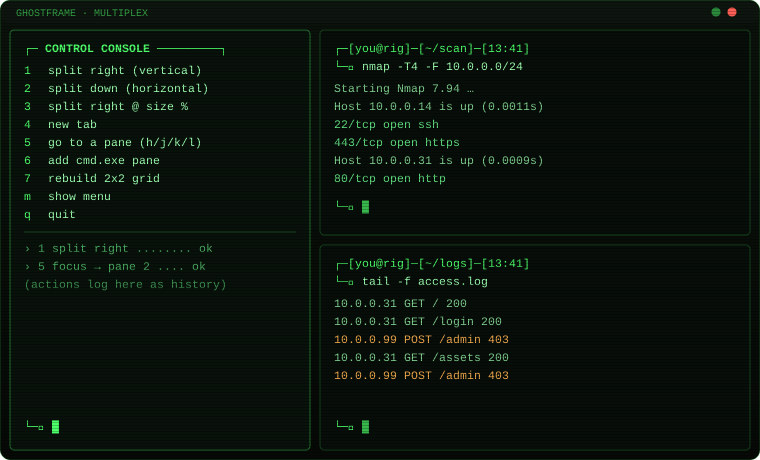
Press [3] and GHOSTFRAME opens a borderless, headerless split workspace. A control console on the left lets you drive every pane with single keypresses — split, focus, resize, new tab — while every action logs below it as history. Ctrl+Shift+0 snaps focus back to the console from anywhere.

GHOSTFRAME [3] MULTIPLEX — layout screenshot
GHOSTFRAME MULTIPLEX split workspace
1 / 2
Split right / Split down
Open a new work pane beside or below the current one, running the GHOSTFRAME shell with the CRT theme.
3
Split right @ size %
Prompts for a percentage for the new pane. Live resize any pane afterward with Alt+Shift+Arrow.
5
Go to pane (h/j/k/l)
Focus any work pane by direction. Vim-style navigation.
Alt+Sh+Z
Zoom pane fullscreen
tmux-style. Zooms the focused pane to fill the window. Press again to restore.
Ctrl+Sh+F11
Toggle header (Focus Mode)
Show or hide the tab bar and title bar live, mid-session. MULTIPLEX launches with it already hidden.
Shift+F10
Toggle CRT shader
Turn the GPU phosphor effect on or off without closing the terminal. Works in any pane.
Ctrl+Sh+0
Snap to control console
Returns focus to the left control console from any pane, no matter how many panes are open.
// The terminal itself
Real GPU CRT — Not a Wallpaper
HUB → [C] CUSTOMIZE → VIBES

The CRT effect is an HLSL pixel shader running on Windows Terminal’s GPU pipeline. Scanlines, phosphor glow, and screen curvature computed per-pixel at render time, not stamped as a background image. Every terminal GHOSTFRAME spawns inherits the look automatically: PowerShell, Command Prompt, Kali. Toggle it live with Shift+F10. Tune it from CUSTOMIZE.

green
Default phosphor green — P31
float3(0.30, 1.00, 0.42). The classic green phosphor of 1980s terminals.
amber
Amber — P3 phosphor
Old-school amber terminal feel. Warm and readable for long sessions.
blue/cyan
Blue or cyan
Cool-toned, slightly futuristic.
white
White monochrome
Clean monochrome with the CRT curvature still active. Set #define MONOCHROME 1 in the shader for true green-screen.
spectrum
Spectrum-cycle mode
Each new GHOSTFRAME window opens in the next color of a 7-stop cycle: green → amber → cyan → blue → purple → rose → white. A wall of tabs fans across the spectrum.
Tune Live in CUSTOMIZE
Glow strength — how far the phosphor bloom spreads from bright characters.
Scanline intensity — the horizontal dark bands. Set to 0 to disable entirely.
Screen curvature — the barrel distortion that makes it read as a glass CRT screen.
Settings save to ghostframe-vibes.json and apply on every launch. Upgrading GHOSTFRAME never resets your vibes.
GHOSTFRAME hub — phosphor CRT active
GHOSTFRAME hub with phosphor CRT shader
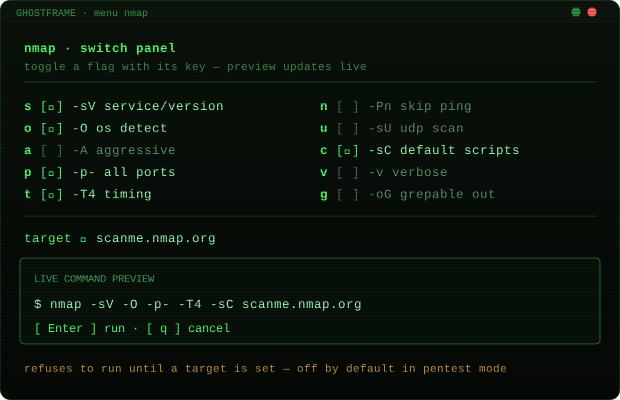
Switch menu panel
GHOSTFRAME menu switch panel
// Claude Desktop + local Ollama
AI Tools — In-Hub Chat, Local Models, Custom Endpoints
HUB → [X]

Launch Claude Desktop, chat with a local Ollama model in-hub with conversation context, or point it at any OpenAI-compatible endpoint you run locally. After a BCHunt sweep, press [s] to summarise findings with your chosen local model — fully offline, nothing leaves the machine.

Claude Desktop — auto-detects the install under %LOCALAPPDATA%\AnthropicClaude or the Start Menu. Launches with one key.
Ollama — launches the desktop app or falls back to ollama serve. Lists your local models live via ollama list, each launches ollama run <model> in a new console.
In-hub chat — pick any model and chat right inside GHOSTFRAME. Remembers the full conversation via Ollama’s local /api/chat. Context is preserved across turns.
Pinned quick-launch models — Dolphin (uncensored) and Llama 3.2 by default. Edit gf-ai-models.json to change them.
Custom OpenAI-compatible endpoints — press [+] to add any base URL (LM Studio, a private server). URLs normalised automatically — /v1/chat/completions appended as needed.
BCHunt AI summary — after any BCHunt sweep, [s] summarises the findings with a risk-oriented analyst prompt against your chosen local model. Fully offline.
GHOSTFRAME [X] AI TOOLS — in-hub chat
AI TOOLS ──────────────────────────── [1] Claude Desktop found at %LOCALAPPDATA% [2] Ollama serve + model list [+] add custom model or endpoint LOCAL MODELS ──────────────────────── [3] dolphin-mistral:7b 4.1 GB [4] llama3.2:latest 2.0 GB [5] deepseek-coder:6.7b 3.8 GB IN-HUB CHAT ─ dolphin-mistral:7b ──────── You: summarize the BCHunt findings AI: Critical item is the dangling Netlify CNAME on dev.barr-cyber.com. An attacker can claim that subdomain right now. The DMARC gap is medium priority...
// Free VPN, no account
VPN — Always Non-US, Zero Cost
HUB → [V]

OpenVPN (installed via winget if missing) connects to VPN Gate — a free academic VPN project run by the University of Tsukuba, Japan. No account required. The selection logic is enforced in code: it will never hand you a US server. Press V again for a different one.

VPN Gate servers — volunteer-run, free, no registration.
Non-US enforced in code — refuses to return a US exit.
Best-scoring selection — often Japan. "Not the USA" not one specific country.
Verify the result at ipinfo.io after connecting.
// Hyper-V + Windows Sandbox
VMs — Kali Purple in One Key
HUB → [M]

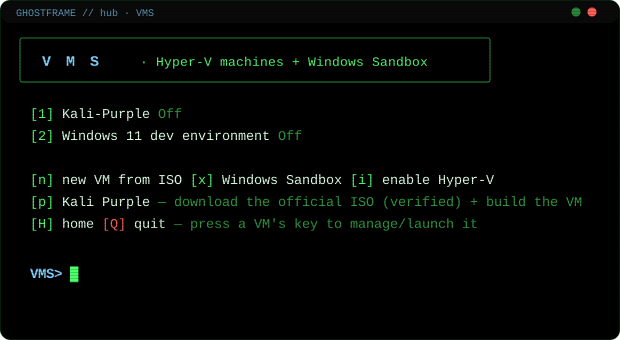
Detects all your Hyper-V VMs and their state. Launch, connect, stop, or save in one key per VM. Build a new VM from any ISO. The Kali Purple option downloads the official ISO from Kali’s CDN, verifies SHA256, and builds the VM.

GHOSTFRAME [M] VMs
GHOSTFRAME VMs screen
// Eight more built-in tools
[E]
SERVERS
Static file server — npx serve or python http.server
Node dev server — npm run dev / start, or npx live-server
Backend services — Nginx, Apache, MySQL, PostgreSQL, Redis, MongoDB, Docker. Start/stop.
SSH server — install, start, stop OpenSSH. Shows exact ssh user@ip.
Save any server config as a Projects preset
[G]
USERS
Shows all local accounts: admin/standard + enabled/disabled
[a] flip admin/standard, [e/d] enable/disable
[x] delete account (files kept) — first suggests [k] disable
[w] wipe: delete account + entire profile folder
Dangerous actions gated: delete own account requires typing delete <name>
[J]
NETMON
Live established connections with PID and process name
Listening ports, connections-by-process bar chart
DNS cache, flush DNS, routing table, ARP table
Ping, port check (Test-NetConnection), traceroute
All network adapter IPs in one view
[R]
PATCHES
Installed hotfixes list (Get-HotFix)
Pending Windows updates via WU COM agent with severity
Update history (last 30 updates)
Reboot-pending registry check
Trigger scan/install via UsoClient, log to Findings
[F]
FINDINGS
Shared store at %LOCALAPPDATA%\GHOSTFRAME\findings.json
Any tool writes findings: severity, tool, title, detail, target
Severity-coloured live log in the [F] screen
[e] generate Markdown report: Critical / Warnings / Info sections
SysAdmin full sweep auto-logs every finding it surfaces
[Z]
HASHES
MD5, SHA1, SHA256, SHA384, SHA512 with clipboard copy
Compare two file hashes; full-folder manifest to CSV
Base64 encode/decode; URL encode/decode
Crypto-RNG password generator (ambiguity-free charset)
GUID generator; VirusTotal hash lookup (logs finding if detected)
[S] BCSEARCH
Guided File Search
Build query with single keys: text, file type, folder, whole-word, case, regex, exclude
KIND presets — email, IP, URL, GUID, MAC, credit-card, SSN, API key, AWS key, TODO/FIXME…
Search multiple folders at once; export timestamped .txt + .csv
Open any match: read, write, or read-write with .bak backup
Live plain-English query preview as you build
[P] + ez + menu
Projects, Search, Commands
PROJECTS — one-keypress folder/app shortcuts. Latest-folder type auto-opens the newest version subfolder.
ez <text> — recursive file search. Case-smart, no syntax. look and search alias it.
menu <tool> — 61 toggle panels (nmap, curl, dig, gobuster, nikto, rsync, tshark…) with live command preview.
menu craft — guided builder to create your own menu <tool> panels without editing JSON.
home — reopen the hub from any terminal. Also Ctrl+Shift+H.
// Changelog
Selected recent versions
v3.0.5
Smart Firewall rebuilt. 11 screens. Port scan + process mapping + 31-danger-port list + HIGH/MED/LOW + one-key apply-all + 6 presets + block by program + audit screen + CSV export. Self-test PASS.
v3.0.4
Fix: GhostClean Smart Scan crashed on PS 5.1 with Measure-Object -Property on a List. Fixed all 5 occurrences. Self-test PASS.
v3.0.0
GhostClean: 10-tool system optimizer. 42 categories, SHA256 Duplicate Finder, Space Analyser with infinite drill-down, Startup Manager with impact scoring, Registry Cleaner (safe/caution rated), File Shredder (DoD 5220), Clean History. Crosses into 3.x line.
v2.8.0
BCHunt +4: SPF/DMARC/DKIM email-auth check, CDN/WAF fingerprint (CNAME chain), Shodan port-risk surface + CVE highlights, GitHub/git exposure. SysAdmin FIX-IT pass. Kali wifi rebuilt with 7 interactive guided steps.
v2.6.0
Findings log + Markdown report generator. Shared store. Any tool writes findings. [F] screen with severity-coloured log and one-key Markdown export. SysAdmin sweep auto-logs every finding.
v2.5.0
Scope enforcement: CIDR/domain allowlist with toggle. When on, any out-of-scope scan target is blocked before the tool runs. Pure-bash CIDR bitwise arithmetic. Persists to scope.env.
v2.4.0
Playbooks. Chained step-by-step engagement sequences. Host triage, web recon, AD/Windows enum, vuln scan. Results to timestamped directory.
v2.3.0
Guided Metasploit post-exploitation: 7 workflows via auto-generated .rc scripts. Local recon, hashdump, process migration, screenshot+keylogger, privilege escalation, persistence, loot.
v2.1.0
Tools catalog to 78 entries across 7 categories. New desktop apps group. Security (pentest mode): Wireshark, Burp Suite Community, ImHex, Angry IP Scanner, HxD.
v1.95.0
SysAdmin overhaul: visual health dashboard with GPU monitoring, FULL SWEEP mode (11 checks, accurate progress bar, findings report, health score 0–100).
v1.75.0
BCHunt: prioritised risk summary HIGH/MED/LOW/INFO, styled HTML report, subdomain-takeover detection (20+ services), IP geolocation/org via ip-api.
v1.45.0
3D storage vault: WPF 3D container, orbit/pan/zoom, drag files in from Explorer, drag out to extract. Pure view over the already-unlocked vault.
v1.31.0
VAULT introduced: DPAPI + AES-256-CBC + HMAC-SHA256 + PBKDF2 @ 600,000 iterations. Password store and encrypted file vault.
v1.48.15
Packet capture: Npcap detection, promiscuous toggle, winget install. (Previous public release before the v3 series.)
// Get GHOSTFRAME
GHOSTFRAME v3.0.5 — Free & Open Source
Unzip anywhere permanent — C:\Tools\GHOSTFRAME\ works well. Double-click GHOSTFRAME.bat. Approve one UAC prompt for the install. Every terminal after that runs un-elevated. Drop in a newer zip when a new version ships — upgrades are silent and clean.
C:\Tools\GHOSTFRAME\GHOSTFRAME.bat
Optional switches
-InstallOnly — apply skin and exit (no hub)
-Force — re-apply even if already installed
-NoInstall — skip install, go straight to the hub
-SetDefaultTerminal — make Windows Terminal the OS default
Barr Cyber — Professional Security Consulting
GHOSTFRAME is free for personal and professional use. If your organization needs a security assessment, firewall hardening, incident response, or an ongoing MSSP relationship — that’s what Barr Cyber does. Montana-based, available remotely.
Get in Touch →